WordPress in the AI search era
GEO is optimization for citations in AI Overviews and answer engines – on WordPress you already have most tools in the block editor and your SEO plugin; what is usually missing is content structure.
In 2026, search often answers before you click a link. Google shows AI Overviews and AI Mode. ChatGPT and Perplexity synthesize responses from many sites at once. For a WordPress blog, that does not mean SEO stopped working. It means ranking alone is not enough if your brand never appears in the AI summary.
This guide is for you if:
- you run a WordPress blog or business site and care about organic traffic;
- you write in the block editor and want to know how to structure posts for citations, not just keywords;
- you already have baseline SEO (XML sitemap, meta, internal links) and want a practical next step without buying a “GEO-only” plugin.
What this article does not promise: guaranteed rankings in every AI model or a shortcut around solid content and technical SEO.
Key Takeaways
- GEO (Generative Engine Optimization) means optimizing to be cited as a source in AI Overviews, ChatGPT, Perplexity, and similar tools.
- On WordPress, GEO is mostly content structure, FAQ sections, JSON-LD schema, and E-E-A-T – not a separate tech stack.
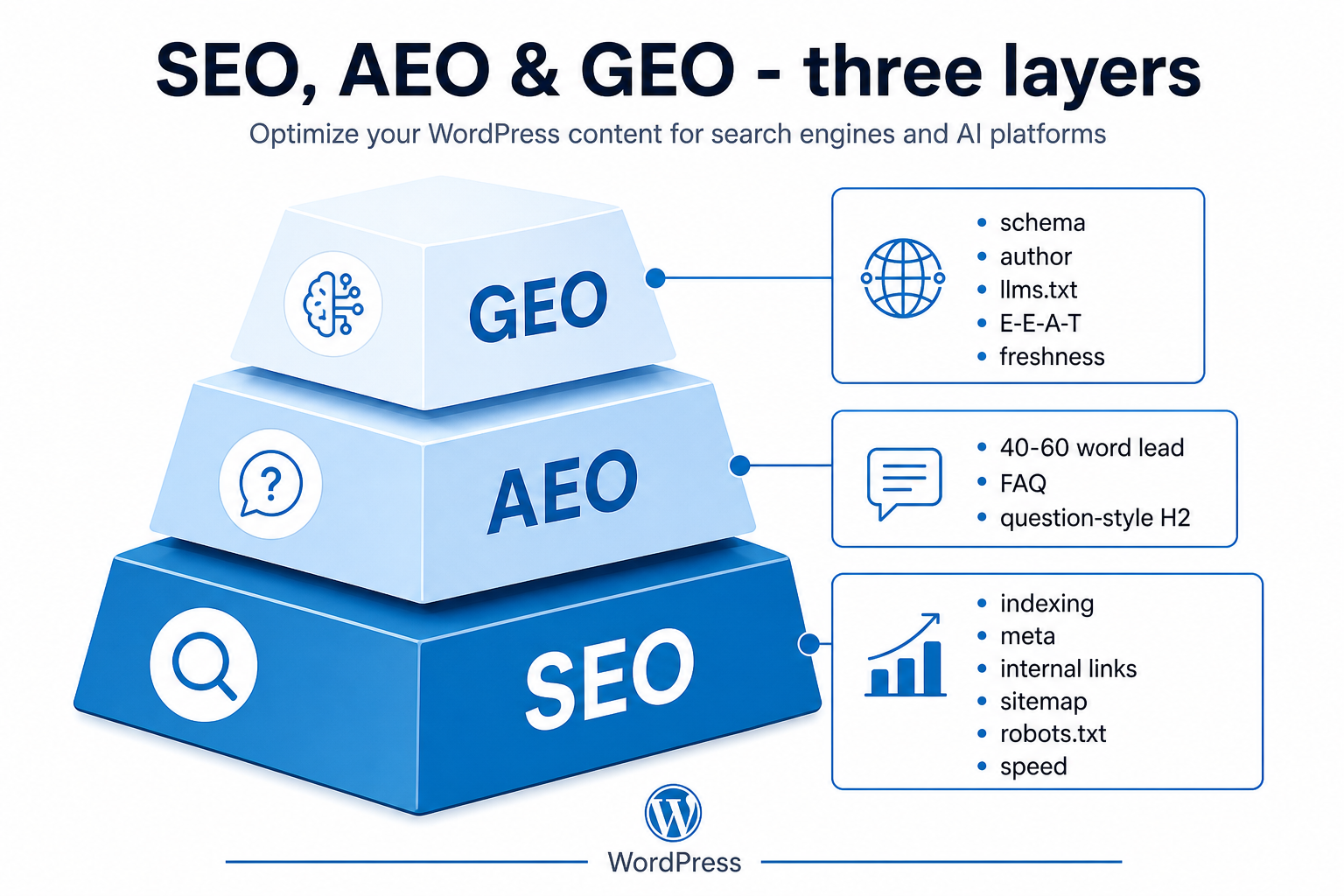
- SEO, AEO, and GEO stack together – index and technical basics first, then answer formatting, then citation signals.
- This hub does not replace guides on XML sitemaps, robots.txt, or SEO plugins – we link to those throughout.
SEO vs AEO vs GEO – what to implement first
SEO earns visibility in results, AEO formats the answer, and GEO combines the signals AI models use when they pick sources to cite.
SEO – what still works on WordPress
SEO is classic search optimization: indexing, meta descriptions, headings, internal links, page speed. If you already have posts on XML sitemaps, robots.txt, or SEO plugins, that is your foundation.
AEO – answer in the first 40-60 words
AEO (Answer Engine Optimization) is about format: a short, complete answer in the bold lead under H2, then expansion.
GEO – the full citation stack
GEO adds schema, authorship, sources, optional experimental llms.txt, entities, and dateModified.
| Aspect | SEO | AEO | GEO |
|---|---|---|---|
| Goal | Rank links in SERPs | Ready answer to a question | Citation in AI responses |
| Where you see it | Blue links on Google | Snippets, PAA, voice | AI Overview, ChatGPT, Perplexity |
| On WordPress | SEO plugin, sitemap, URLs | Bold H2 lead, FAQ in body | Schema + author + content chunks |
| Priority | 1 – foundation | 2 – content format | 3 – machine-readable signals |
Important: AEO and GEO extend SEO, they do not replace it. Do not buy a GEO-only plugin if content is thin or schema does not match visible HTML.
How answer engines pick sources to cite
Answer engines look for chunks they can quote without extra context – question-style headings and a bold H2 lead often matter more than another keyword in meta.
Models split the page into chunks and score whether a paragraph stands alone as an answer.
Google AI Overviews and AI Mode
Google still ranks pages with classic SEO signals first – generative features then summarize or cite from that indexed set. Treat GEO hypotheses as extras on top of proven SEO, not a replacement.
Verified: July 2026 against Google’s documentation on optimizing for generative AI / AI features in Search. In practice:
- Proven SEO – crawlable HTML, clear titles, helpful unique content, internal links, technical health (sitemap, robots, Core Web Vitals).
- Helpful for AI surfaces – short direct answers under headings, visible Q&A, authorship, dates, and primary sources.
- Unproven GEO claims – any promise that a specific schema type or file alone will win AI Overview citations. Do not plan budgets around that.
Google-Extended in robots.txt controls how Google may use your content for Gemini and grounding products. It does not control whether you appear in Google Search results or your Search ranking. Separate Googlebot crawl rules from Google-Extended if you need different policies. See also robots.txt best practices.
ChatGPT, Perplexity, and Copilot
Shared preferences across answer engines: specifics over fluff, structured HTML, E-E-A-T, and freshness. Each product has its own crawlers and citation rules – do not assume Google behavior maps 1:1.
What this means for your WordPress blog
Write quotable chunks, add a useful FAQ for readers, keep solid technical SEO, and use schema for machine clarity – not as a SERP rich-result tactic for FAQ.
Content structure AI can quote
Models most often lift one paragraph under a heading – if your bold lead answers the question directly, you improve citation odds without rewriting the whole post.
Answer engines do not read your article like a human from top to bottom. They split the HTML into chunks – usually one H2 section at a time – and score whether a block can stand alone as an answer. On WordPress, you control that almost entirely in the block editor: headings, bold leads, lists, and internal links. No custom theme code required.
A weak section looks like a long intro before the point. A strong GEO section puts the complete answer in the first 40-60 words under the H2, then adds context, examples, and links below.
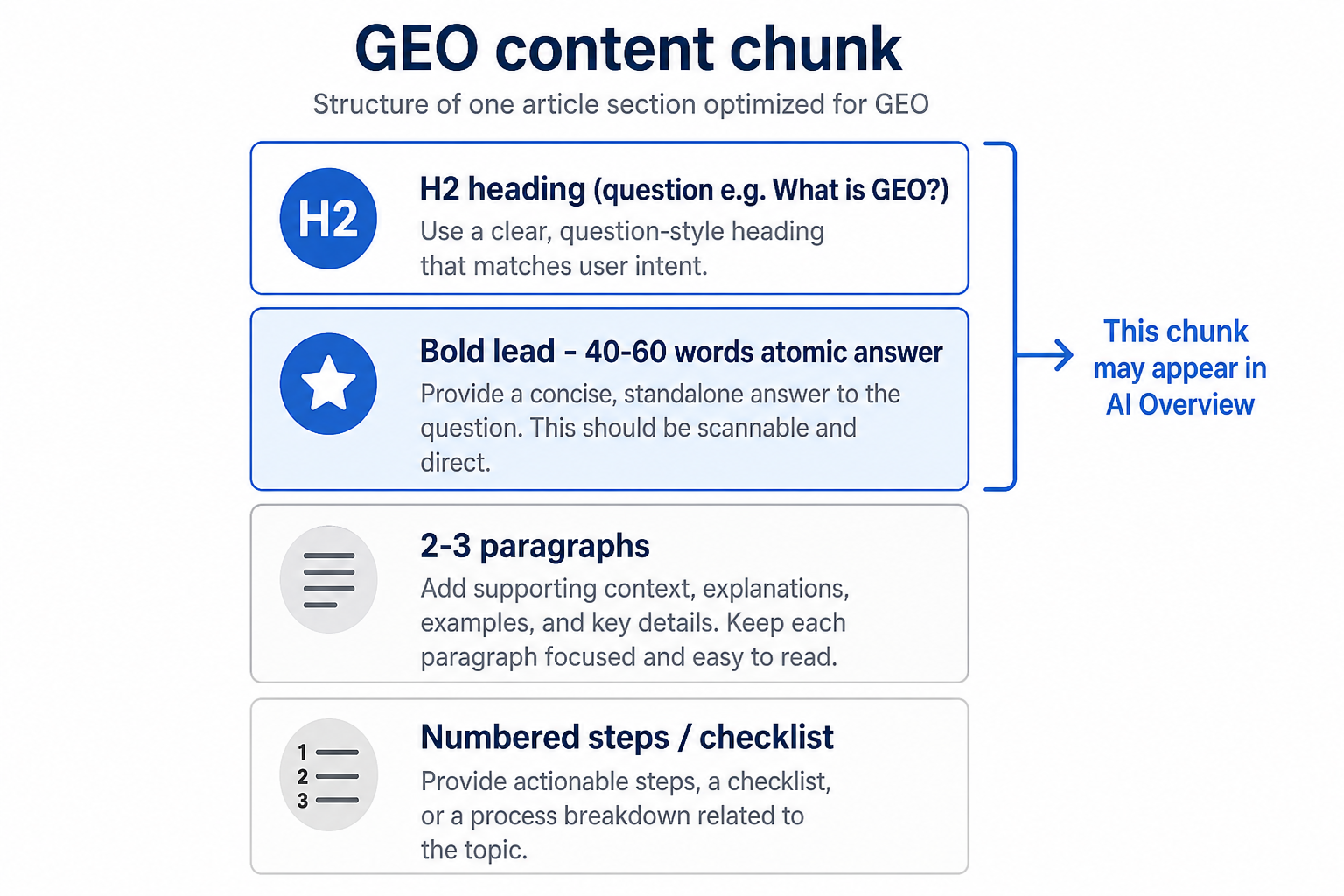
H2 section pattern
Repeat this layout for every major section – it matches how both Google snippets and AI summaries extract text.
- H2 – state the topic as a question or clear label (e.g. “How do I add FAQ schema in WordPress?”).
- Bold lead – 40-60 words that fully answer the H2; readable without scrolling to the next paragraph.
- 2-4 paragraphs – nuance, WordPress-specific steps, links to deeper guides on your site.
- Numbered list – procedure, checklist, or ranked options when the reader needs order.
Example lead under an H2 about XML sitemaps: An XML sitemap lists URLs you want indexed; in WordPress you generate it with your SEO plugin and submit it in Search Console so crawlers and AI-facing systems discover new posts faster. That sentence could be quoted as-is. The paragraphs below can go into detail without carrying the whole answer.
Key Takeaways inside long posts
Three to five bullets after the intro or before FAQ give models a ready-made summary block – use them on pillar guides like this one.
Keep each bullet to one idea. Start with the term you want associated with your site (GEO, FAQPage, llms.txt). Avoid repeating the H2 lead word-for-word – expand or angle it differently.
Structure mistakes that hurt citations
- One giant H2 with ten paragraphs and no bold lead.
- Burying the answer after 200 words of background.
- Using H2 only for styling, not for a single clear subtopic.
- Mixing three unrelated questions under one heading.
Tip: Save H2 + bold lead + paragraph + list as a block pattern in the editor (Patterns → Create pattern). Reuse it on every new post so GEO structure is default, not an afterthought.
Building FAQs from real search questions
FAQ is not filler at the bottom of the page – it is explicit question-answer pairs that AI systems prefer as ready-made citation blocks.
When someone asks “Does GEO replace SEO?” a model looks for a short, direct match. A visible FAQ section gives that match in HTML (optional FAQPage schema can mirror it for parsers). Hidden FAQ markup alone (text users never see) violates the spirit of visible parity and can trigger quality issues – keep questions on the page.
Where to find questions
Start with queries people already use to reach your site, then expand with SERP and audience input.
- Google Search Console – Performance → Search results → Queries. Filter or scan for question words: how, what, why, can, does, is. Export phrases that match your post topic.
- People Also Ask – Google the main keyword for your draft; copy PAA questions you can answer honestly in 2-4 sentences.
- Reader questions – comments, support tickets, social replies. If three people asked the same thing, it belongs in FAQ.
- Competitor gaps – note questions rivals answer vaguely; answer them concretely with WordPress steps.
How many FAQ items and how to write them
Aim for 3-5 questions per post; each answer should be 2-4 sentences and usable without the rest of the article.
Phrase the question exactly as users search. Answer in plain language first, then add a detail or link. Do not paste the entire post into the answer. If an FAQ needs 300 words, it is probably its own H2 section, not an FAQ item.
Place FAQ after the main guide body and before related posts – same order users and crawlers expect. On WP-Dude, the author box sits outside the post content; your FAQ stays inside the article HTML.
JSON-LD schema on WordPress – GEO minimum
JSON-LD is the machine-readable layer next to HTML – Article and FAQPage tell models what is a question, what is an answer, and who wrote the piece.
WordPress does not ship FAQPage out of the box. Your SEO plugin (Yoast, Rank Math, All in One SEO, etc.) injects JSON-LD in <script type="application/ld+json"> tags. GEO work is making sure that JSON matches what visitors see – same questions, same answers, same author.
Article / BlogPosting
Most SEO plugins output Article or BlogPosting automatically for posts – verify author name, published date, and modified date after updates.
When you materially edit a GEO guide, update the post and confirm dateModified changes in the schema (view page source or a structured-data validator). Freshness signals help both classic SEO and AI systems that weigh recency for fast-moving topics like search features.
FAQPage schema – for users and parsers, not FAQ rich results
Google ended FAQ rich results for most sites on 7 May 2026 and removed the FAQ rich-result documentation in June 2026. Keep FAQ for readers and AI parsing – do not promise an expanded FAQ SERP feature.
Verified: July 2026. FAQ still helps people and models find short answers. If you emit FAQPage JSON-LD, every pair must appear in the rendered HTML – no hidden-only FAQ markup. Use your SEO plugin’s FAQ block or visible Q&A that stays in sync with schema. One FAQ section per URL is enough for most blogs.
Article / BlogPosting schema remains useful for authorship and dates. FAQPage is optional structure for Q&A clarity – not a ranking lever and not a Google FAQ rich-result playbook.
Validation workflow
After publish, validate structured data for errors – and remember FAQ is no longer a rich-result target in Google Search.
- Open the live post URL (not preview).
- Check JSON-LD in page source or a structured-data validator for parse errors.
- Confirm Article (and FAQPage if present) has no critical errors.
- Spot-check that FAQ questions match visible headings or block text.
Important: Schema supports understanding – it does not guarantee an AI Overview citation, and it will not restore retired FAQ rich results. Thin content with perfect JSON-LD still loses to clearer competitors.
llms.txt – worth it on WordPress?
llms.txt is experimental – a curated list of important URLs some tools may read. It complements robots.txt; it does not replace it, and it is not required for WordPress or for Search rankings.
robots.txt tells crawlers what they may fetch. An optional plain-text file at /llms.txt can list pillar guides, docs, pricing, and policies for LLM context. Verified: July 2026 – there is no confirmed ranking or citation benefit from Google or major answer engines. Skip it until technical SEO and content structure are solid; treat it as a low-effort experiment, not a WordPress standard.
When it helps vs when to skip
Add llms.txt when you have clear content pillars; skip it if you still have basic SEO gaps.
- Worth it: multi-topic blog with hub pages, SaaS docs, agency site with service + case study hubs.
- Skip for now: five-page brochure site, no XML sitemap, or FAQ structure still missing.
- Keep it short: 10-30 links with one-line descriptions – not a duplicate sitemap.
More on crawl rules: Power of robots.txt in WordPress. A dedicated llms.txt tutorial for WordPress is planned as a separate satellite article – this hub only covers the concept.
Non-generic content AI can trust
Original data, screenshots, dated verification, and clear sources beat generic AI-sounding paragraphs every time.
- Your own data – measurements, case notes, before/after, error logs (redacted).
- Screenshots – wp-admin paths, settings, SERP or tool output with dates.
- Author experience – what you tested on WordPress 7.x / PHP 8.x, what failed, what you shipped.
- Verification dates – add “Verified: July 2026” (or current month) next to time-sensitive claims.
- Primary sources – link wordpress.org, php.net, Google Search docs, vendor changelogs – not only secondary blogs.
For launch quality on AI-built sites, use the AI-built website checklist. For sitemap mechanics beyond plugins, see create a custom XML sitemap without plugins.
E-E-A-T, authors, and trust signals
AI systems cite sites with recognizable authors and verifiable facts more often than anonymous, undated walls of text.
Experience, Expertise, Authoritativeness, and Trustworthiness (E-E-A-T) are quality concepts from Google’s guidelines. You do not toggle E-E-A-T in a plugin – you demonstrate it with real bylines, accurate claims, and maintainable content.
Author and byline
Show who wrote the post – name, role, link to an about page or author archive.
On WP-Dude, the author box is rendered globally on every blog post. In WordPress, set a real user as author, fill the profile, and avoid generic “Admin” on public guides. Match the author in Article schema when your plugin allows it.
Sources, dates, and updates
Cite primary sources for stats; update posts when WordPress, Google, or tools change – then refresh visible date and schema.
- Link to official docs (WordPress.org, Google Search Central) for volatile features like AI Overviews.
- Add “Last updated” in the intro or rely on theme/plugin date display – stay honest.
- Remove outdated screenshots and steps when a major WP release changes the UI.
Trust red flags for AI and search
Models and quality raters both downrank vague, anonymous, or overstuffed content.
- No author on YMYL-style topics (health, finance, legal) – less common on WordPress blogs but worth noting.
- Unsourced numbers (“90% of sites fail GEO”) without a link.
- Mass-published AI drafts with no human review or examples.
Technical foundation (short)
GEO sits on technical basics – if the site is not indexed or loads slowly, no FAQ structure fixes that.
Think of technical SEO as layer zero: crawlers and answer engines must reach fast, clean HTML before they evaluate your bold leads and FAQ. On WordPress, most fixes are configuration, caching, and plugin hygiene – not GEO-specific plugins.
What to fix first
- Indexation – confirm important posts return 200, are not blocked in robots.txt, and appear in your XML sitemap.
- Performance – Core Web Vitals and server response time; slow pages get crawled less and cited less.
- Rendered HTML – schema and FAQ must exist in the HTML users and bots receive (critical for headless setups).
Deeper guides on WP-Dude:
- XML sitemap in WordPress – discovery and crawl efficiency for new GEO content.
- Measuring and auditing WordPress page speed – baseline before you publish long pillar posts with images.
- WordPress headless guide – ensure JSON-LD and FAQ markup ship in the frontend HTML, not only in the WP admin preview.
GEO mistakes to avoid
The most common mistake is treating GEO as another keyword layer.
- Hidden FAQ schema only.
- Keyword stuffing in leads.
- Fake statistics without sources.
- Bulk AI rewrites without review.
- GEO plugin instead of content.
- Cannibalization across many posts.
- Ignoring technical SEO.
Pre-publish GEO checklist for one post
Run through this list once before you hit Publish.
- One primary intent / question.
- Bold H2 lead (40-60 words) on every major section.
- Key Takeaways (3-5 bullets).
- FAQ (3-5 questions) from real queries.
- Article schema + optional visible FAQ (no FAQ rich-result expectation).
- Author and updated date.
- At least 2 internal links.
- Meta description 140-160 characters.
- Structured data validates without critical errors.
- (Optional, experimental) Pillar URLs in llms.txt – not required.
Summary
WordPress GEO is mostly better content chunks, honest FAQ, and schema – on top of the same solid SEO you should already be doing.
Key Takeaways
- GEO extends SEO for AI citations.
- Bold H2 leads and FAQ are the fastest wins.
- Visible FAQ for readers/AI – not for retired Google FAQ rich results.
- E-E-A-T and dateModified support trust.
- Full llms.txt guide – separate article.
FAQ
Does GEO replace SEO on WordPress?
No. GEO extends SEO with answer structure and schema for AI citations. XML sitemaps, meta tags, internal links, and page speed remain the foundation.
How is GEO different from AEO?
AEO is content format (a short answer at the start of a section). GEO also includes schema, authorship, entities, llms.txt, and trust signals.
Does FAQPage schema guarantee AI Overview visibility?
No. Schema can help parsers understand Q&A. It does not guarantee AI Overview citations, and Google no longer shows FAQ rich results for most sites (retired May 2026). Ranking, quality, and competition still decide outcomes.
Do I need llms.txt on a small WordPress site?
Usually no. Improve post structure and a useful FAQ first. llms.txt is experimental with no confirmed ranking impact – add it later only if you have clear content pillars and spare maintenance time.
How often should I update content for GEO?
When facts change – edit the post and refresh dateModified in schema. A date bump without real changes does not help.